04 / 04Lead / sole product designerThree companies · five years
Three systems, five years, one maturing architecture
Across three companies I've built design systems that grew with my craft and the tooling's capability curve — from a components-and-variants library built from scratch as a startup's first designer, through a platform-scale light/dark theming implementation, to the current work: a full dark-theme migration on a two-layer token architecture, with Figma variables exported straight to engineering. The newest system is under NDA, so its visuals here are schematic — drawn in this site's own line language.
ROLE
Lead or sole owner, all three systems
SCOPE
Tokens · components · theming · handoff
OUTCOME
1,000+ token replacements · 150+ pages migrated
TWO-LAYER TOKEN ARCHITECTURE — ABSTRACTED (NDA)
LAYER 1 — BASE TOKENS
Primitive ramps — color, space, type. Named by value. No opinions.
LAYER 2 — SEMANTIC ALIASES
Surface / Primary
Text / OnBackground
Border / OnPopup
Named by role. This is the layer themes remap.
COMPONENTS
button — reads Surface/Action
input — reads Border/Default
card — reads Surface/Raised
Reference roles only. Never touch Layer 1.
DARK THEME = REMAP LAYER 2 → LAYER 1
COMPONENTS NEVER KNOW THE THEME CHANGED
FIG. 01 — The architecture of the current system, abstracted. Base tokens are aliased by role; themes are a mapping change, not a component rewrite.
§ 01
The problem
Design systems are the most crowded claim in senior design. Every designer's LinkedIn says "design systems experience." The word has lost its shape.
What's actually true across a mature practice is narrower and harder to see from the outside: a design system isn't an artifact. It's a series of architectural decisions about how tokens, components, variants, and conventions relate — made under the specific constraints of the product, the team, and the tools available at the time. A good system survives contact with new requirements. A great one gets more capable as the tools around it do. I've built three, at three different points in both my career and Figma's capability curve. They look different because the constraints were different — not because the thinking changed.
§ 02
Constraints & role
Each system was built under different conditions, with one through-line: solo or lead ownership in every case, collaboration used where it helped rather than by default. The arc below runs oldest to newest — and the newest is under NDA, which is why its portion of this page is drawn, not screenshotted.
§ 03
The arc — three systems
SYSTEM 01 · STARTUP · PRE-VARIABLES ERA
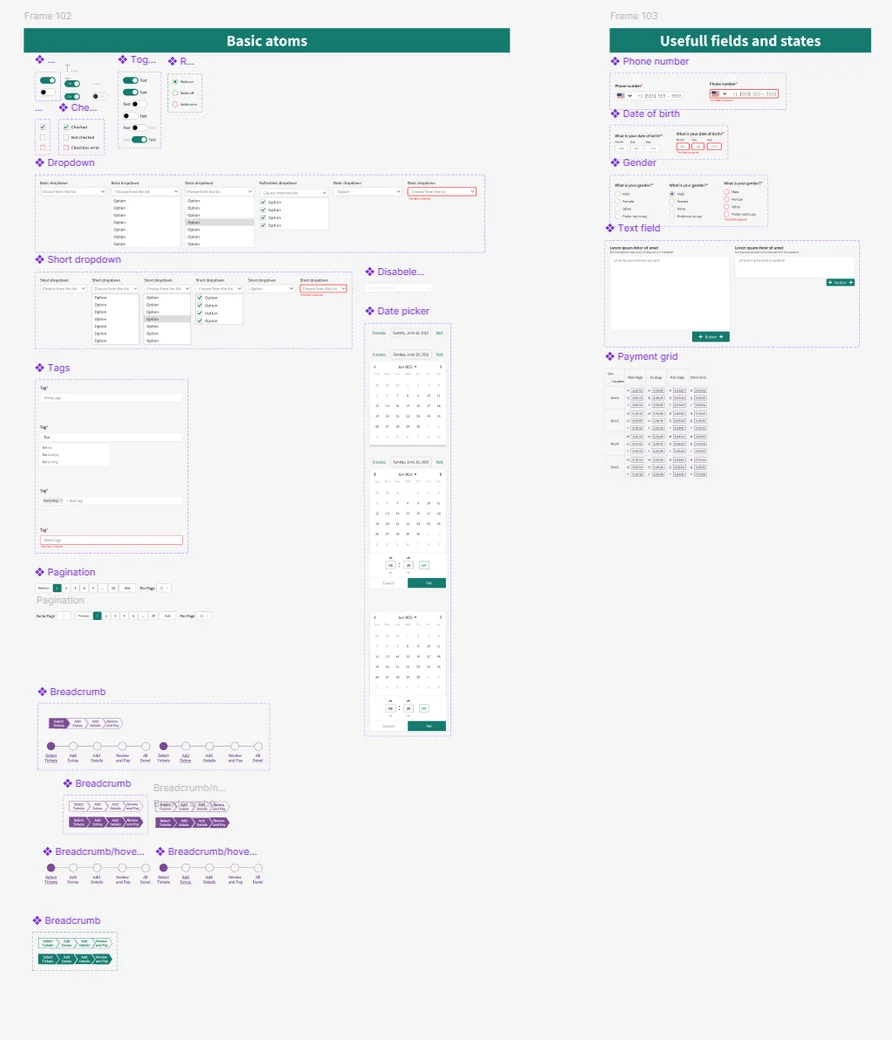
The founding system
I joined Upped Events as the first designer: no system, no library, no conventions. I built everything from scratch alongside the actual product — components extracted as they were needed, patterns solidified as they got reused. It grew from a solo project into a library used by 10+ interns and later two full-time designers. This was pre-Variables Figma: every reusable pattern a component, variations as variants, tokens applied at the style level. Semantic naming existed only in style names, with no enforcement — the architectural thinking was visible, but the tooling couldn't yet express a two-layer model. The system outlasted the company's acquisition.
FIG. 02 — The Upped Events system: the foundation that started the practice.
SYSTEM 02 · PLATFORM SCALE · VARIABLES ARRIVE
Two-layer tokens and the theming migration
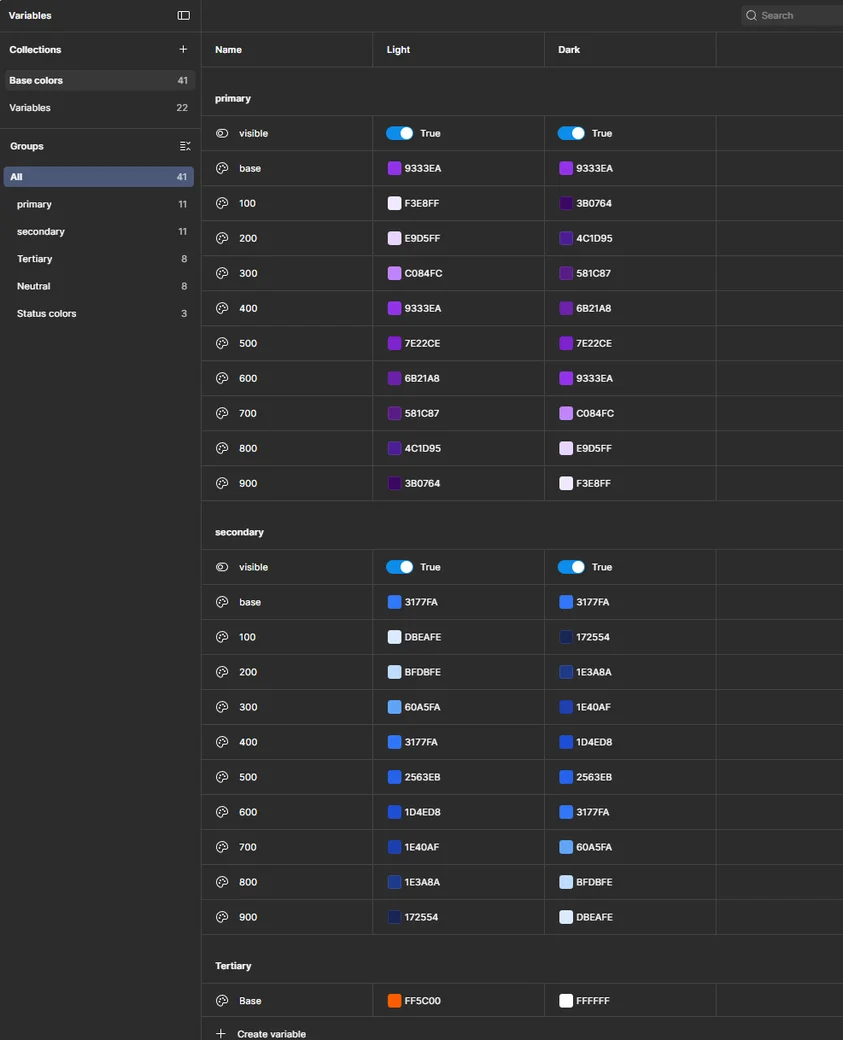
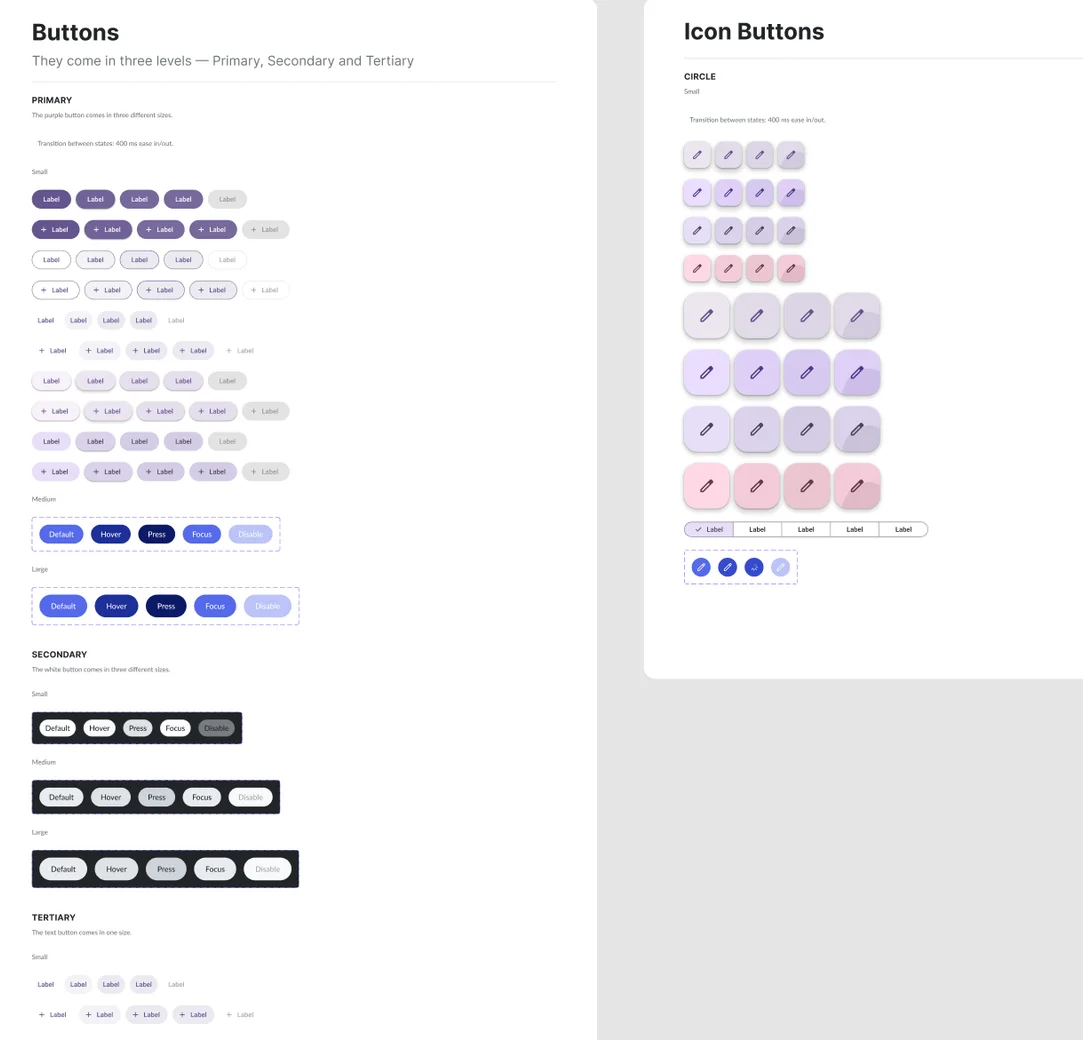
Once Figma Variables arrived, the token system could finally be expressed as two tiers: base primitives organized by family, semantic variables organized by function — Surface, Text, Border, Button, Spacing. Component state matrices covered the full interaction range, and governance became a practice: alternatives pitched, trade-offs documented, the system treated as a living negotiation. Then the architecture got its stress test — a light/dark theming implementation that meant 1,000+ token replacements across 150+ prototype pages. The migration went through because the layers were right: components referenced roles, so the work was re-pointing references, not redesigning screens.
FIG. 03 — Two-layer token architecture: base tokens at the foundation, semantic variables on top. Themes are a mapping change, not a component rewrite.FIG. 04 — Full state matrices across all button variants, every state documented and code-connected — the system as a design-to-engineering bridge, not a Figma-only artifact.
SYSTEM 03 · CURRENT · UNDER NDA
The dark-theme migration, end to end
The most recent work is where the practice currently lands, and it can't be screenshotted — so it's drawn. A full dark-theme migration built on the two-layer architecture in FIG. 01: base tokens plus semantic aliases, so the theme is a remapping, not a rebuild. Around it, three supporting moves: a Figma variable export pipeline feeding tokens directly to engineering, an icon-system migration to stroke-based sets, and component architecture rebuilt on Auto Layout patterns so structure absorbs content change instead of breaking under it.
VARIABLE EXPORT PIPELINE — ABSTRACTED (NDA)
FIGMA VARIABLES→EXPORT→TOKEN FILE→ENGINEERING
ONE SOURCE OF TRUTH · NO HANDOFF DOCUMENT · RENAMES AND REMAPS TRAVEL AUTOMATICALLY
FIG. 05 — Tokens flow from the design file to the codebase without a translation step.
§ 04
Decisions that carried forward
DECISION 4.1
Semantic over literal, always
A token named Blue600 tells you its value. A token named Surface/Primary tells you its role. One of these survives a redesign; the other doesn't.
The reasoning +
Values change — the brand updates, the palette refreshes, dark mode gets added. If components reference literal tokens, a redesign means editing hundreds of components. If they reference semantic tokens, it means changing the semantic-to-literal mapping in one place. Light and dark mode don't have different components; they have different mappings.
I learned to default to semantic naming in the first system, where it existed only in style names with no enforcement. By the second and third, Figma Variables let the architecture enforce itself. Same decision, growing capability to express it — the tooling caught up to the thinking. The 1,000-replacement migration is the receipt: on literal tokens it would have been a redesign; on semantic tokens it was a remap.
DECISION 4.2
Tokens are a pipeline, not a palette
In the current system, Figma variables export directly into a token file engineering consumes. The token layer stops being documentation about the design and becomes the contract between design and code.
The reasoning +
The traditional handoff treats tokens as reference material: a styles page engineers read once and re-implement by hand. Every rename, every remap, every new alias then needs a meeting or a ticket, and the two sources of truth drift.
Exporting variables directly inverts that. The design file is the source; the token file is its API; engineering builds against roles, exactly like the components do. When the dark theme shipped, it shipped as data — a second mapping in the same file — not as a redesign project on the engineering side.
DECISION 4.3
Migrations prove the architecture
A dark theme isn't just a color decision — it stress-tests every layer. Icons moved to stroke-based sets because strokes render theme-neutrally; components moved to Auto Layout patterns so structure absorbs change. The theme shipped because the layers beneath it held.
The reasoning +
Filled icon sets carry their own fills, which means they carry opinions about the background they sit on — and a theme migration surfaces every one of those opinions as a bug. Stroke-based sets with a single weight take their color from the semantic text tokens like any other glyph, so the icon system stopped being a special case.
Auto Layout matters for the same reason at the structural level: components built on it respond to content and density changes by rule, not by hand-adjustment, so a system-wide migration touches definitions instead of instances. The pattern across all three moves is the same — push change into the layer built to absorb it.
ICON MIGRATION — ABSTRACTED (NDA)
FILLED · RETIRED
STROKE · CURRENT
ONE STROKE WEIGHT · COLOR FROM TEXT TOKENS · THEME-NEUTRAL BY CONSTRUCTION
FIG. 06 — Stroke icons inherit theme color like text does; filled sets carried background opinions the migration exposed.
§ 05
Outcome
3
SYSTEMS BUILT & OWNED
5
YEARS OF PRACTICE
1,000+
TOKEN REPLACEMENTS
150+
PAGES MIGRATED
The first system was a library. The current one is an approach that instantiates into libraries: a dark theme shipped as a token remapping, variables flowing to engineering without a translation step, an icon system that stopped being a theming special case, and component structure that absorbs change by rule. That shift — from artifact to practice — is what senior design-systems work actually means. If the next product needs a fourth system, I already know how to build it; what adapts is what the product needs.
§ 06
What I'd do differently
Nothing about the decisions. Quite a bit about how I've documented the practice. Each system lives in its own file with its own conventions, and the reasoning behind the decisions — why things are the way they are — is scattered across file pages, threads, and my head.
Starting over, I'd maintain a living practice document. Not system documentation — that's well covered — but the decision record that made the systems what they are. This case study is a retroactive attempt at that document. It should have existed all along.