A dashboard that reshapes itself around what the event needs
Organizers juggle dozens of tools across a months-long event lifecycle: planning, running, reviewing. I designed a dashboard that changes its own composition as the event moves through phases — pre-event, during, post-event. In usability testing, organizers stopped navigating the rest of the system entirely and completed tasks directly from the dashboard.
ROLE
Lead designer · solo project
SURFACE
Admin panel · the most-visited page
OUTCOME
Validated with real organizers · minutes → seconds
The problem
Running an event through Upped Events is a months-long process that touches most of the platform. Before the event: configuring ticket types, onboarding staff, approving vendors, building the schedule. On the day: live revenue, check-ins, vendor issues in real time. The week after: reconciling payments, reviewing attendance, reading feedback, closing out financials.
Each task lived in its own part of the admin panel. The organizer knew the features existed somewhere — they'd used them before — but finding them meant clicking through navigation layers or learning the system's taxonomy by heart. Locate staffing, finish the task, back to the dashboard, search for the next thing. Repeat.
The existing dashboard wasn't solving this. It was a generic overview — a few metrics, a task list, some shortcuts — and it was the same shape before, during, and after the event. It reflected the system's structure, not the event's timeline. Organizers weren't using it as a workspace; they were using it as a door to walk through on the way to something else.
Constraints & role
I owned the admin panel's primary surfaces at Upped Events, and the event dashboard was the most-visited page on the platform — essentially every organizer session started and returned there. Redesigning it was a solo project.
The brief was broad: the PM wanted "a better dashboard." My work was figuring out what better meant — which pointed at a deeper question. The dashboard wasn't failing at being a dashboard. It was failing at being the right dashboard for the moment the organizer was in. Pre-event and post-event are not the same job, and a single static layout can't serve both.
The approach
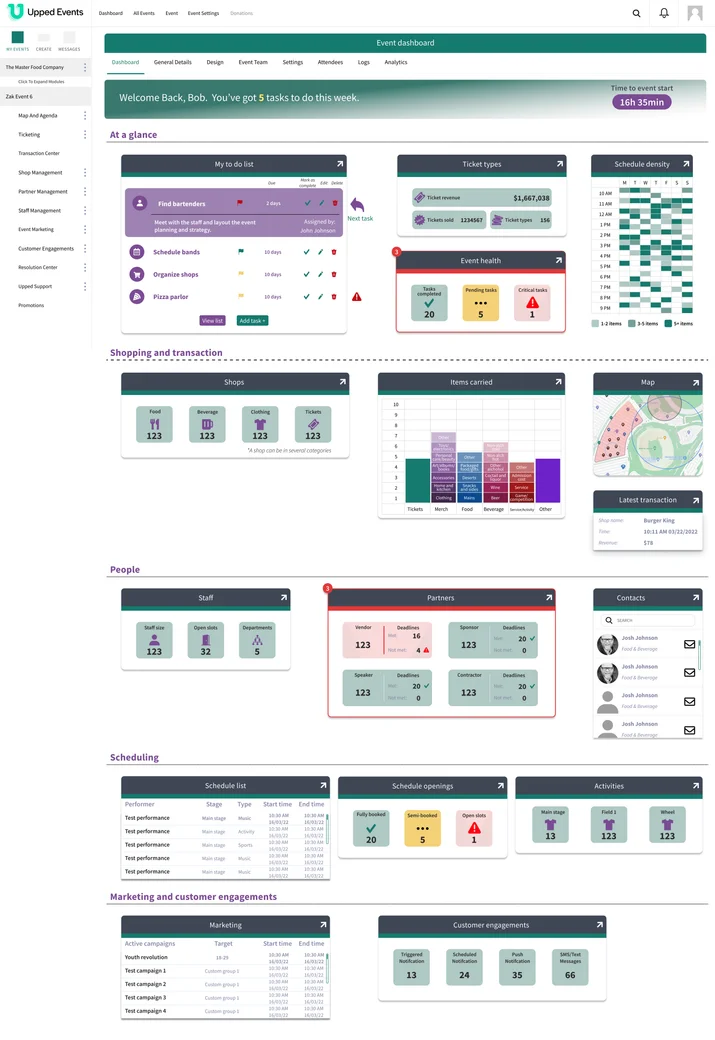
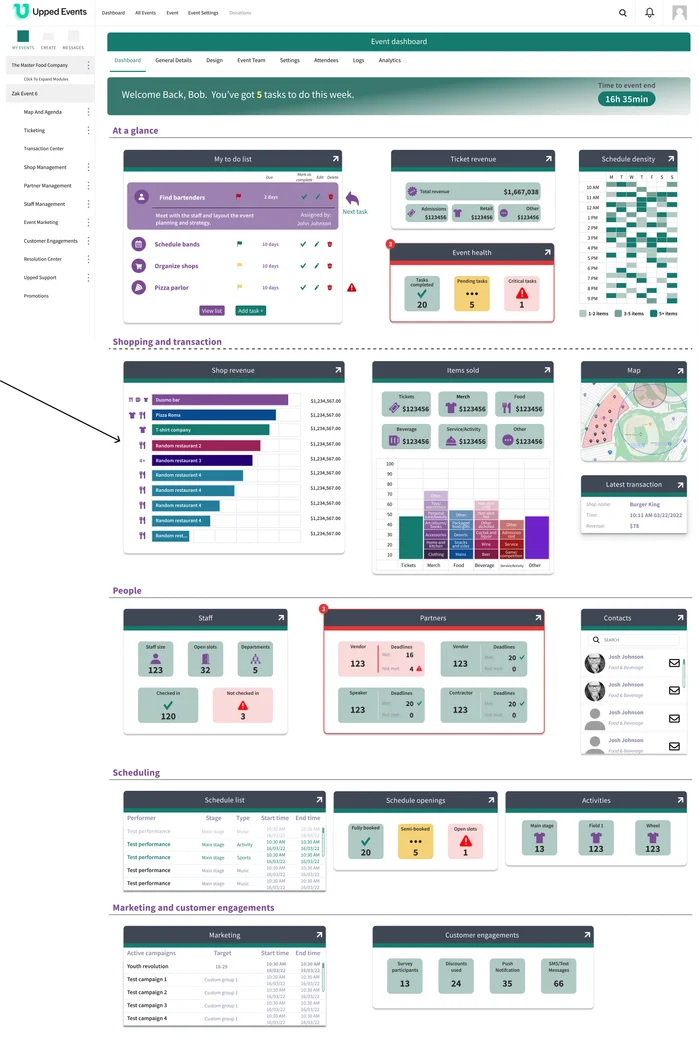
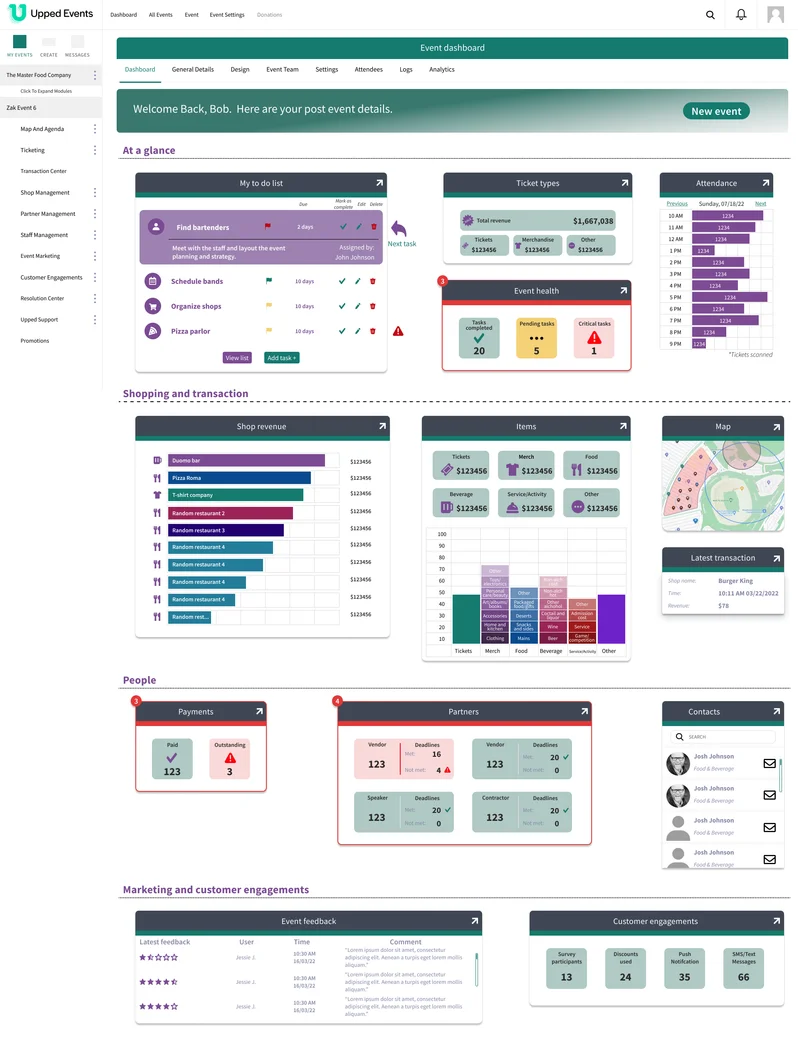
The design thesis: the dashboard should know what phase the event is in and reshape itself around what that phase needs. Same underlying widget library, three different compositions. Phase detection happens automatically from the event's start and end dates — the organizer doesn't pick a mode; the dashboard knows.
Key decisions
DECISION 4.1
Phase as a design variable, not a filter
The same widget shown at different phases isn't the same widget. "Ticket types (156 sold)" before the event and "Ticket revenue ($1.6M gross)" during it are the same underlying data with completely different framings.
The reasoning +
The easy version of a phase-aware dashboard shows all the widgets all the time and filters by relevance. It's technically simpler and it's wrong. Filtering produces a dashboard that contains the right widgets; reshaping produces one that leads with them. The organizer's first glance decides what they do next — if the most important widget for this phase is fourth in the grid, the dashboard has already failed.
So widgets get recomposed, not hidden. Ticket configuration and ticket revenue share a slot: the first before launch, the second during. Schedule density and attendance share a slot. Each slot surfaces the right question for the phase — and because the card patterns, chart types, and grid hold across all three, the dashboard feels continuous as it changes. One workspace that evolves, not three layouts to learn.
DECISION 4.2
Designing for the task, not the feature
Organizers weren't thinking "which part of the system does this live in." They were thinking about what needed to happen. The dashboard became the surface where intent-level tasks resolved directly, without navigation.
The reasoning +
The navigation organized the admin panel by feature — Ticketing, Transaction Center, Shop, Partners, Staff, Marketing, Engagements, Resolution Center. Clean system architecture; wrong model for someone reaching for a quick action. "Is staffing covered?" and "approve the last three vendor applications" aren't feature names, they're tasks, and mapping each task back to its category is overhead the organizer shouldn't carry.
So the dashboard surfaces tasks directly: a to-do list with deadlines and check-off controls inline, a staff widget with open slots and check-in status one click from detail, a partners widget with vendor status and inline deadline warnings. In testing this produced a shift I hadn't expected: organizers stopped using the primary navigation. The dashboard became the workspace; the feature pages became the detail view for whatever it couldn't fit.
DECISION 4.3
No mode-switching, ever
Phase transitions happen automatically from the event's dates. The organizer doesn't pick a view, doesn't configure anything, doesn't think about phases. The dashboard knows what day it is.
The reasoning +
The alternative — a tab control, a segmented toggle, a "view as" dropdown — would have been more flexible and more explicit. It also would have been wrong. The organizer already knows what phase the event is in; they're living it. The dashboard's job is to match their state, not ask about it.
Implicit phase also simplified the design: widgets don't need meta-labels about which phase they belong to. A revenue widget during the event just shows revenue. The interface stays clean of mode indicators because the mode is obvious from the content.
Outcome
The phase-aware dashboard was designed, prototyped, and validated through within-subject usability tests with real Upped Events customers, including organizers from the Alaska Beer Festival. Each user saw both the existing dashboard and the new one. Tasks that took two-plus minutes to locate in the old system — finding staffing, checking vendor applications — took seconds on the new dashboard. The strongest finding was behavioral: once users learned what the dashboard surfaced, they bypassed the primary navigation entirely.
The dashboard was in the final stretches of implementation when Upped Events was acquired by Events.com, and the implementation was deferred during the transition. The Figma file is complete, the validation is documented, and the design survived the acquisition as a reference artifact. The same IA pattern — dashboard as intent-organized workspace — was later applied to a vendor-facing dashboard at Upped, where I led UX and research and partnered with another designer on visual execution.
What I'd do differently
The validation was qualitative — directed tasks, behavioral observation in moderated remote sessions — not quantitative. That's the right research for the question I was asking ("does this reshape the organizer's mental model?"), and the findings were strong. But I was one designer with a handful of customers, and without production instrumentation I can't say how durable the behavior was across months of use. Did organizers keep bypassing navigation after the novelty wore off? I have hypotheses, not data.
Designing it again, I'd build in measurable moments: instrumentation hooks on specific widget interactions, lightweight feedback prompts at phase transitions. Not full analytics — the minimum evidence the next iteration of the design would need.