One feature, two very different users
Events.com's complimentary-tickets flow had to work for CS agents comping hundreds of tickets in a batch and for self-serve organizers comping five. I designed the feature from CSM requirements, rebuilt it after a rejected v1, and the shipped version cut related support tickets by 40%.
ROLE
Sole designer, requirements → handoff
SURFACE
Event admin panel · 3-step wizard
OUTCOME
Related support tickets −40%
The problem
Comping tickets was a known pain point at Events.com, and it took two forms depending on event size.
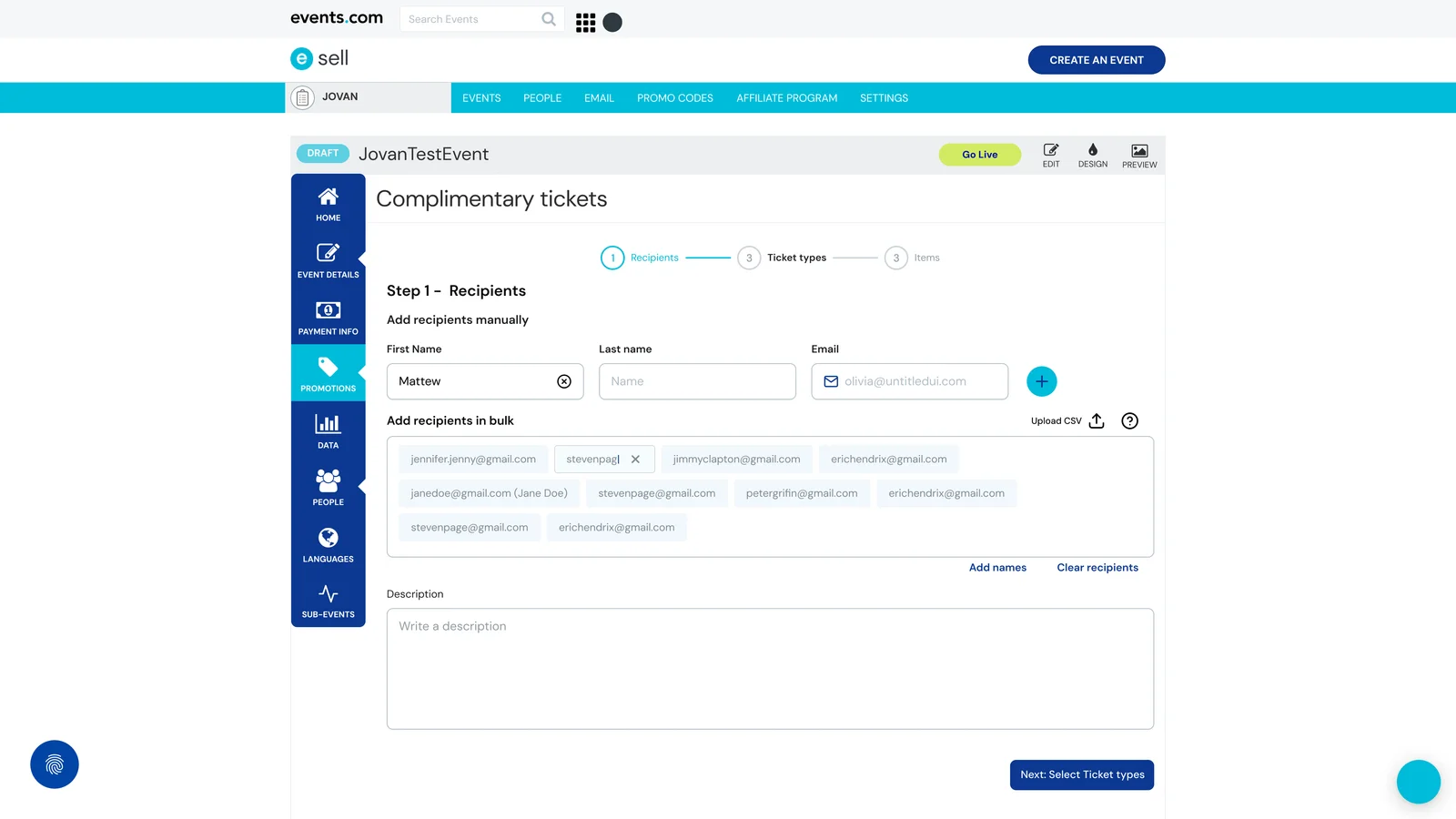
At smaller events, the organizer handled it themselves: create a $0-priced ticket type, email it to individuals, hope nothing falls through the cracks. No items could be attached — no t-shirts, no parking passes, just a bare ticket. At larger events, a Customer Success agent did the same work at higher volume, sometimes comping hundreds of tickets in a single batch, one recipient at a time. No batching, no CSV upload, no way to track which comps had actually landed.
Both paths produced support tickets: recipients who never got their comp, items promised but not issuable through the system, organizers asking whether a specific comp had gone out. The CS team flagged it as a product gap, the CSM and PM wrote a two-page requirements document, and that's where I came in.
Constraints & role
The two-page requirements document gave me the what: a feature for comping tickets to individuals and batches, with item support, built into the existing event admin panel. It didn't give me the how — no flows, no IA, no interaction decisions. That was my work.
I was the sole designer on the feature from requirements through final Figma handoff. The PM owned scope and prioritization, the CSM represented customer success and organizer needs in review, and engineering implemented against my designs. Collaboration where it helped; solo ownership on design decisions.
The approach
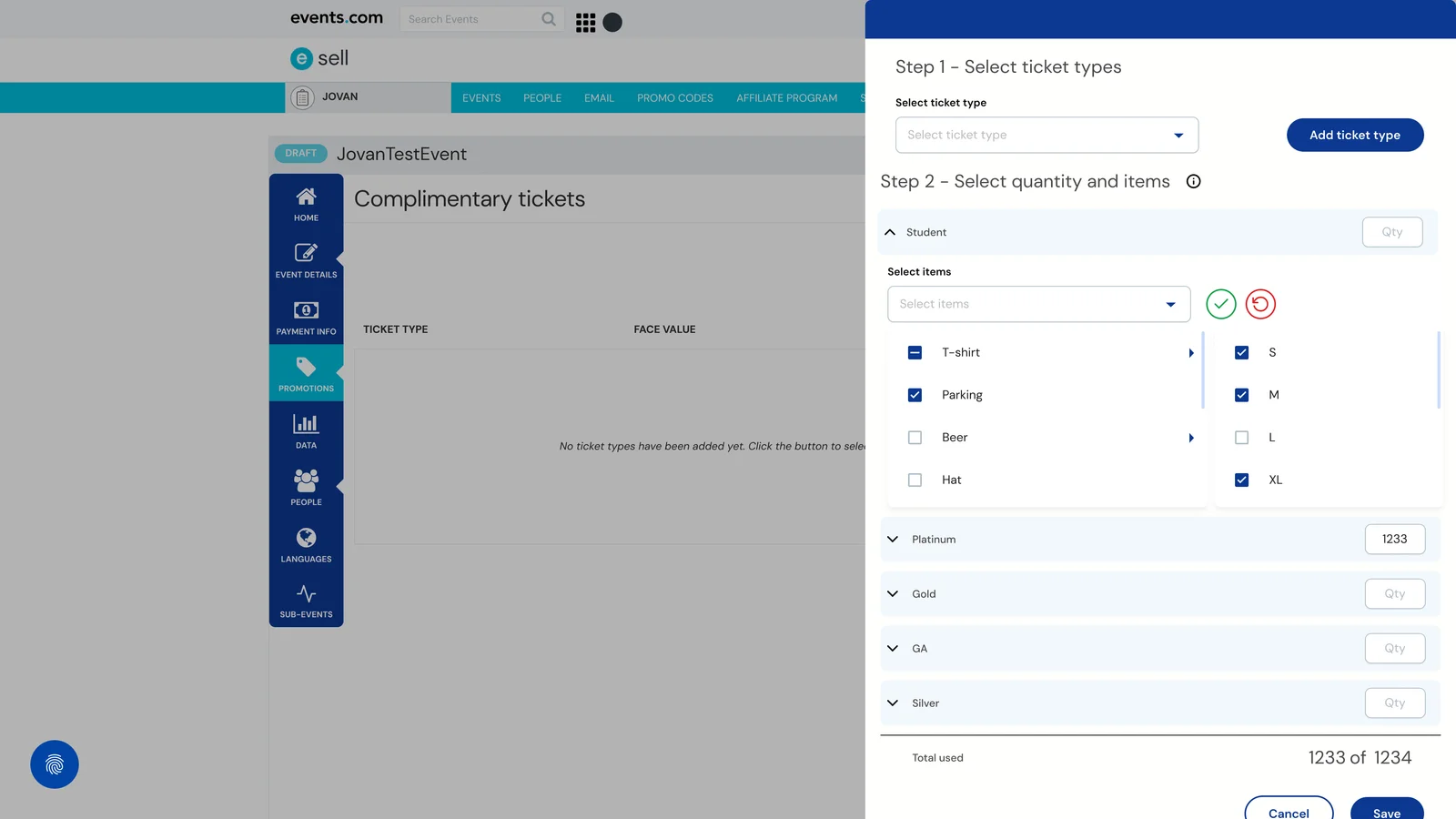
My first pitch was a side-modal: a single dense surface for recipients, ticket types, and items all in one place. It looked clean in Figma. It failed in review. The feedback from CS agents was blunt — "this is too much at once; we context-switch constantly during support calls; give us one thing to focus on at a time." The self-serve organizers echoed it. They didn't want a cockpit; they wanted to be walked through.
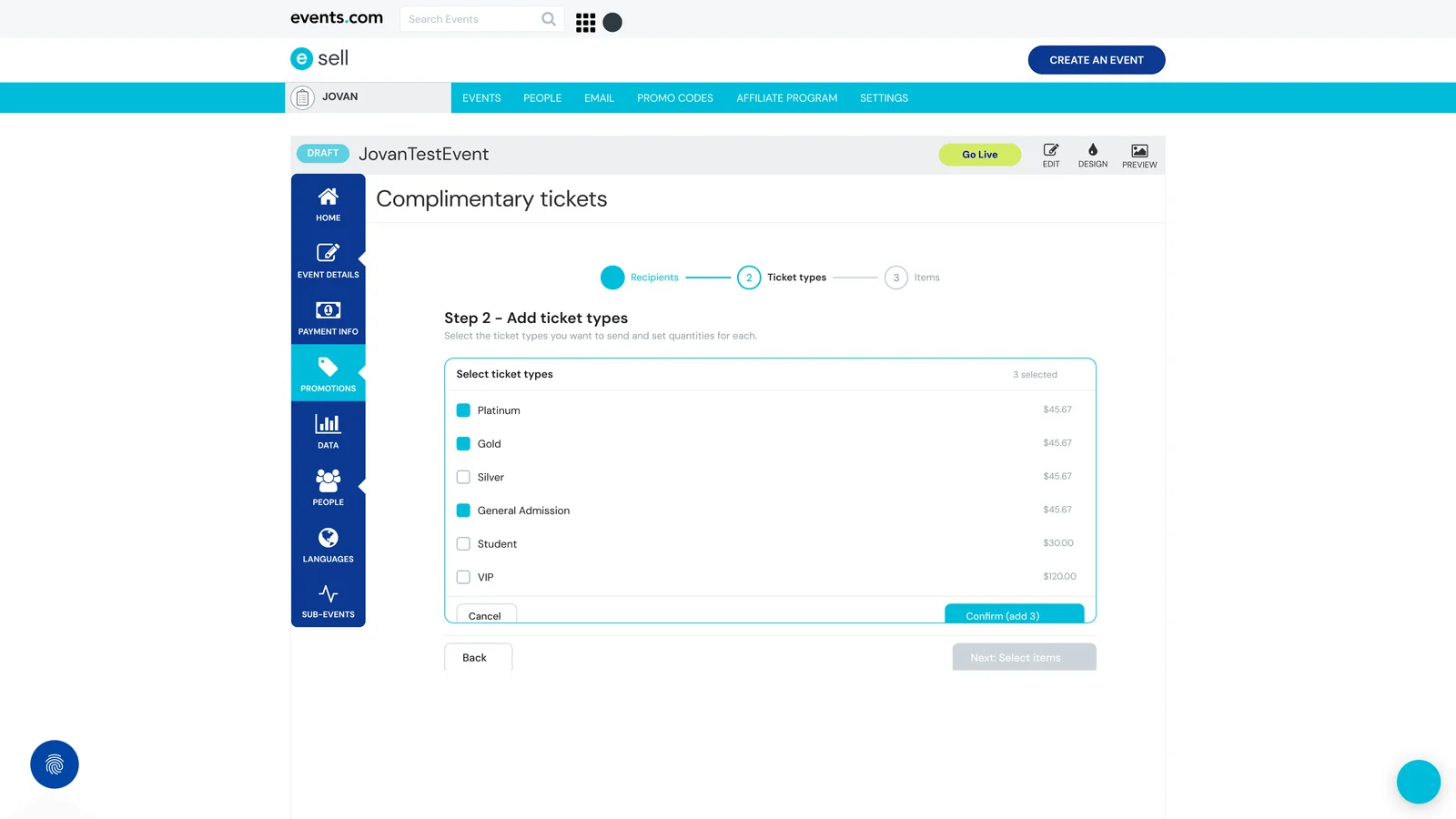
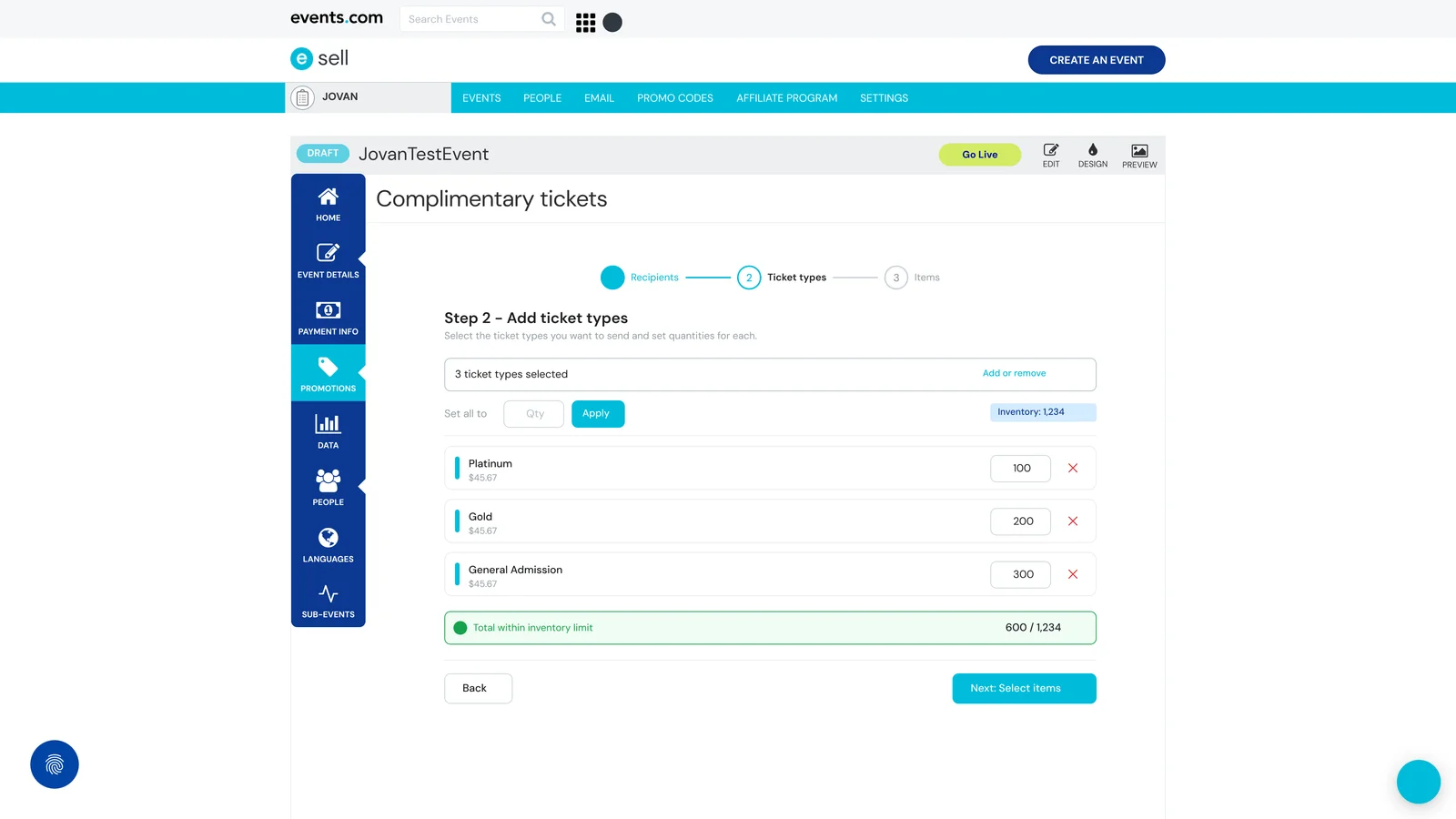
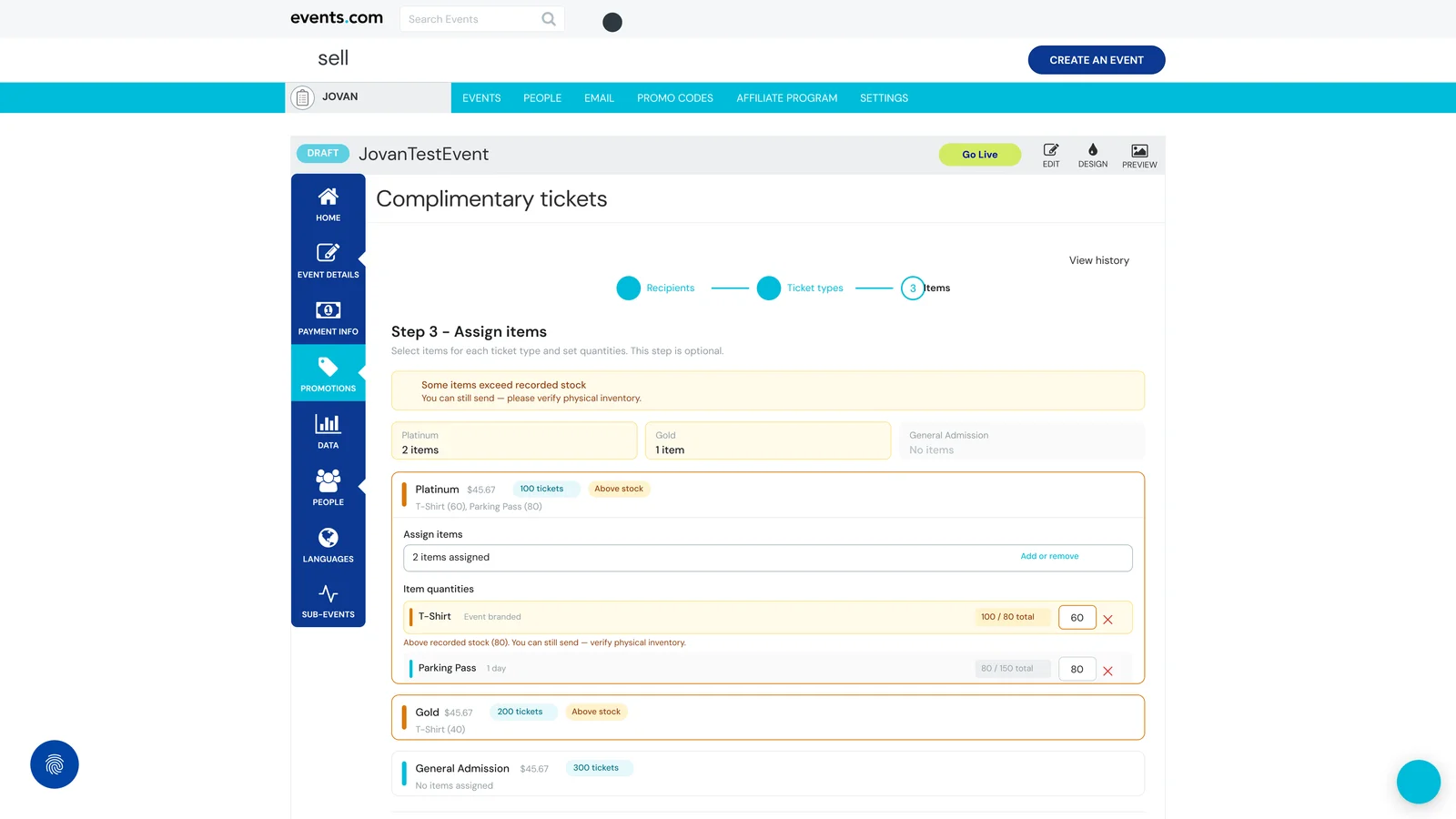
So v2 broke the flow into three steps, each on its own page. Step 1, recipients: dual input — manual entry for small-batch work, bulk paste and CSV upload for CS agents at scale. Step 2, ticket types: which tiers to send, with per-recipient quantities and prices shown, so the user sees the value of what they're comping. Step 3, items: optional — t-shirts, parking passes, merch assigned per ticket type, with stock indicators and soft validation when requests exceed recorded inventory.
I also designed a companion surface — a Comp Batch History with delivery status and resend — which was deprioritized for engineering resources and hasn't shipped. More on that at the end.
Key decisions
DECISION 4.1
Dual-input for recipients
The feature had to serve CS agents comping hundreds and organizers comping five. So Recipients has two input paths on the same screen — manual chip entry on top, paste-or-upload below, parsing both "Name <email>" and plain emails. Not two flows: one flow with two affordances, and no forced choice at the door.
The reasoning +
Most wizard-style pickers commit to one input style: everything manual (fine for small batches, punishing at scale) or everything CSV (fast at scale, overkill for five). Splitting into two flows — "are you comping few or many?" — would have worked, but it forces a decision the user doesn't want to think about.
Organizers comping five type them in. CS agents paste the list and move on. Same screen, same step. The dual-input is the two-user design thesis made concrete in one interaction.
DECISION 4.2
Hard gates on structure, soft validation on stock
You can't proceed without ticket types selected — that's structural; the feature breaks without them. But you can proceed when item quantities exceed recorded stock, because physical inventory is the ground truth, not the system record.
The reasoning +
The default move on over-stock warnings is to block. It feels safer; it isn't. CS agents often know the physical situation better than the database — extra t-shirts arrived that morning, passes were printed in bulk, the warehouse manager confirmed the overage in person. Block on stock and the user either works around the feature entirely or calls engineering, defeating its point.
So stock is a three-level warning, never a gate: a banner on Step 3, a per-card warning, a per-line warning with a link to verify. Informed three times, stopped zero times. Structural gaps do block — you can't reach Step 3 without ticket types, because the assignment screen would have nothing to assign to. Hard gates on structure, soft validation on business judgment: the tool respects the human where the human knows more than the system.
DECISION 4.3
Progressive disclosure on the assignment step
Step 3 shows the cards that need attention expanded and the clean ones collapsed to a one-line summary. The UI does the triage the user would otherwise do themselves.
The reasoning +
By Step 3 you might be assigning items to six ticket types. Six cards expanded at full detail is a scroll-fest — exactly what sent me back to the drawing board after v1. So the step knows which cards matter: stock warnings expand by default, clean cards collapse to a "200 tickets · T-Shirt (40)" header. Expandable if you want; ignorable if you don't.
It's the same principle v1 got wrong at the whole-screen level. A wizard's job is to focus attention. If every step is dense, it isn't a wizard — it's a multi-page form.
Outcome
The three-step wizard shipped at Events.com. A quarter after launch, the CSM reported back: support tickets related to comping dropped by roughly 40%. That number comes from their side of the business, not mine — I didn't instrument the feature for it. The reduction is most directly attributable to eliminating manual one-off ticket creation, the workflow producing most of the support load in the first place.
The feature now serves both user types on the same flow. CS agents comp in bulk, organizers comp in small batches, and neither group has to think about which mode they're in.
What I'd do differently
The wizard ends at "Send." The tracking and retry layer — a Comp Batch History with delivery status and resend I designed alongside it — was deprioritized for engineering resources and hasn't shipped. The Figma file is approved; the quarter it needed never came. Nothing about it was novel: batch listings with retry are standard infrastructure in most mature SaaS platforms. It just hadn't been built yet at Events.com.
What I'd change is less "push harder for History" and more "be clearer upfront that the wizard has a natural edge where tracking begins." The feature can be honestly described without it — but if I were selling a v2 to stakeholders today, I'd name the boundary and the audit piece in the same sentence.